

What’s inside?
In this example, you will learn how to:- Chain multiple Liquid Foundational Models to build a complete workflow that processes visual data (invoice images) and extracts structured information
- Set up local AI inference using Ollama to run Liquid models entirely on your machine without requiring cloud services or API keys
- Build a file monitoring system that automatically processes new files dropped into a directory
- Extract text from images using the LFM2-VL-3B vision-language model for optical character recognition
- Transform unstructured text into structured data using the LFM2-1.2B-Extract model for information extraction
- Create agentic workflows that combine multiple AI models to solve real-world business problems while keeping your data private and secure
Understanding the architecture
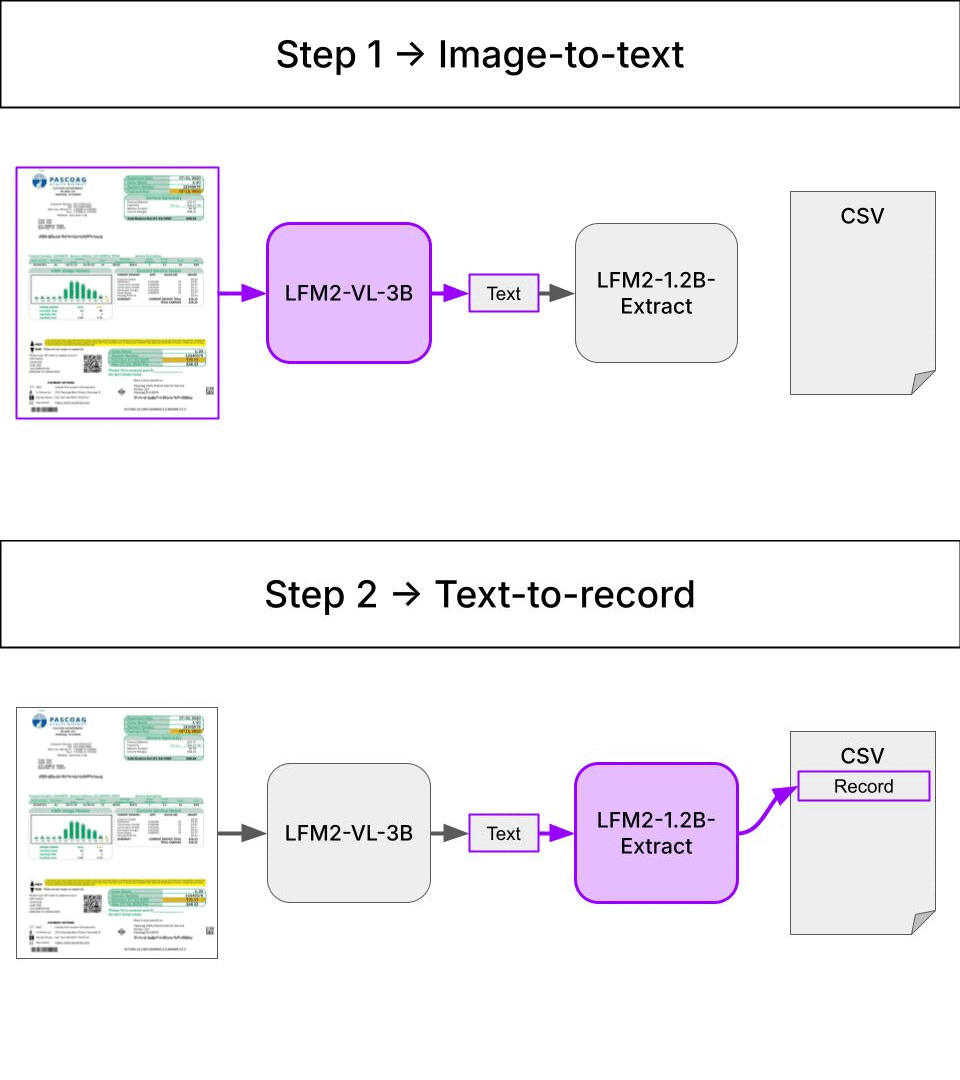
When you drop an invoice photo into a watched directory, the tool uses a chain with 2 Liquid Foundational Models:- LFM2-VL-3B extracts a raw textual description from an invoice picture.
- LFM2-1.2B-Extract tranforms the raw textual description into a structured record. This record is appended to a CSV file.
Environment setup
You will need- Ollama to serve the Language Models locally.
- uv to manage Python dependencies and run the application efficiently without creating virtual environments manually.
Install Ollama
Click to see installation instructions for your platform
Click to see installation instructions for your platform
Install UV
Click to see installation instructions for your platform
Click to see installation instructions for your platform
macOS/Linux:Windows:
How to run it?
Let’s start by cloning the repository:For example, you can use the 1.6B version of the VLM model and the 350M version of the extractor model as follows:
make installed, you can run the application with the following command:
bills.csv. If you open the file, you will see the following data:
| processed_at | file_path | utility | amount | currency |
|---|---|---|---|---|
| 2025-10-31 11:25:47 | invoices/water_australia.png | electricity | 68.46 | AUD |
| 2025-10-31 11:26:00 | invoices/Sample-electric-Bill-2023.jpg | electricity | 28.32 | USD |
| 2025-10-31 11:26:09 | invoices/british_gas.png | electricity | 81.31 | GBP |
| 2025-10-31 11:42:35 | invoices/castlewater1.png | electricity | 150.0 | USD |
- The first 3 invoices are properly extracted, with the correct amount and currency.
- The fourth invoice is not properly extracted, where both amount and currency are not correct.
How to improve it?
We have a tool that works well 75% of the time on our sample of invoices, which is- good enough for a demo
- not good enough for a production-ready application
- Collect more invoices
-
Collect model input and outputs at each step of the pipeline, including
- the VLM model input and output
- the extractor model input and output
- Flag and correct (input, output) pairs that are not properly extracted
- Fine-tune the model(s) on the corrected (input, output) pairs
Our tool uses two Liquid Foundational Models:
- LFM2-VL-3B for vision-language understanding
- LFM2-1.2B-Extract for information extraction
🚗Car Maker IdentificationFine-tune LFM2-VL to identify car makers from images. Learn structured generation with Outlines and parameter-efficient fine-tuning with LoRA.LaptopCustomization
Need help?
Join the Liquid AI Discord Community and ask. Edit this page