

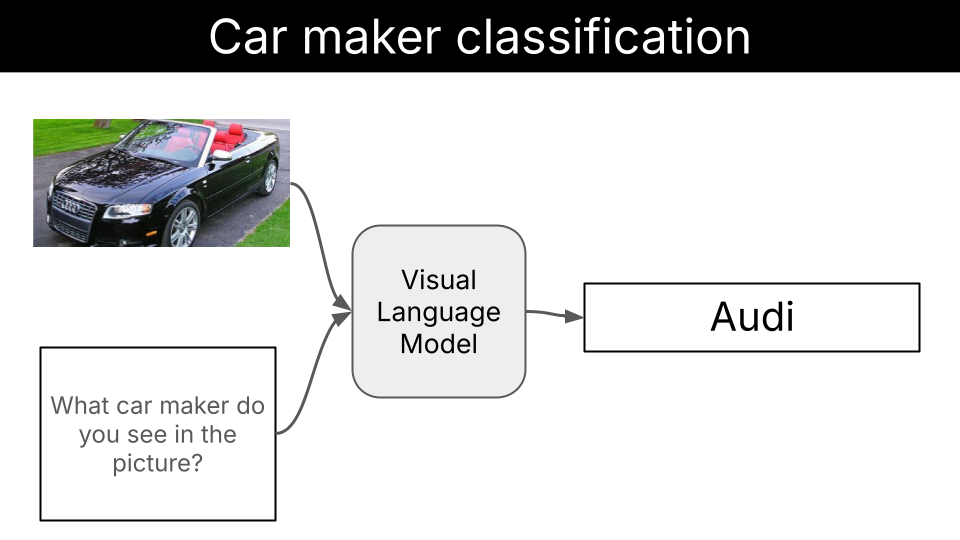
This is what you will learn
In this example, you will learn how to:- Build a model-agnostic evaluation pipeline for vision classification tasks
- Use structured output generation with Outlines to ensure consistent and reliable model responses and increase model accuracy.
- Fine-tune a Vision Language Model with LoRA to further improve model accuracy.
Quickstart
1. Clone the repository:
2. Evaluate base LFM2-VL models without structured generation
3. Evaluate base LFM2-VL models with structured generation
4. Fine-tune base LFM2-VL models with LoRA
Environment setup
You will need- uv to manage Python dependencies and run the application efficiently without creating virtual environments manually.
- Modal for GPU cloud compute. Fine-tuning a Vision Language Model without a GPU is too slow. One easy way to get access to a GPU and pay per usage is with Modal. It requires 0 infra setup and helps us get up and running with our fine-tuning experiment really fast.
- Weights & Biases (optional, but highly recommended) for experiment tracking and monitoring during fine-tuning
- make (optional) to simplify the execution of the application and fine-tuning experiments.
Install UV
Click to see installation instructions for your platform
Click to see installation instructions for your platform
macOS/Linux:Windows:
Modal setup
Click to see installation instructions
Click to see installation instructions
- Create an account at modal.com
-
Install the Modal Python package inside your virtual environment:
-
Authenticate with Modal:
If the first command fails, try:
Weights & Biases setup
Click to see installation instructions
Click to see installation instructions
- Create an account at wandb.ai
- Install the Weights & Biases Python package inside your virtual environment:
- Authenticate with Weights & Biases:
This will open a browser window where you can copy your API key and paste it in the terminal.
Install make
Click to see installation instructions
Click to see installation instructions
- Install make:
Steps to fine-tune LFM2-VL for this task
Here’s the systematic approach we follow to fine-tune LFM2-VL models for car maker identification:- Prepare the dataset. Collect an accurate and diverse dataset of (image, car_maker) pairs, that represents the entire distribution of inputs the model will be exposed to once deployed. You want to cover as many car makers as possible, to make sure you are never out of distribution.
- Establish baseline performance. Evaluate pre-trained models of different sizes (450M, 1.6B, 3B) to understand current capabilities. If the results are good enough for your use case, and the model fits your deployment environment constraints, there is no need to fine tune further. Otherwise, you need to fine-tune.
- Fine-tune with LoRA. Apply parameter-efficient fine-tuning using Low-Rank Adaptation to improve model accuracy while keeping computational costs manageable.
- Evaluate improvements. Compare fine-tuned model performance against baselines to measure the effectiveness of our customization. If you are happy with th results, you are done. Otherwise, you need to dig deeper into model failures and improve the dataset you started with, or the fine-tuning process.
Step 1. Dataset preparation
A fine tuned Language Model is as good as the dataset used to fine tune itA good dataset for image classification needs to be:
- Accurate: Labels must correctly match the images. For car maker identification, this means each car image is labeled with the correct manufacturer (e.g., a BMW X5 should be labeled as “BMW”, not “Mercedes-Benz”). Mislabeled data will teach the model incorrect associations.
-
Diverse: The dataset should represent the full range of conditions the model will encounter in production. This includes:
- Different car models from each manufacturer
- Various angles, lighting conditions, and backgrounds
- Different image qualities and resolutions
- Cars from different years and in different conditions (new, old, dirty, clean)
- Classes: 49 unique car manufacturers.
- Splits: Train (6,860 images) and test (6,750 images) splits.
Step 2. Baseline performance of LFM2-VL models
Before embarking into any fine-tuning experiment, we need to establish a baseline performance for existing models. In this case, we will evaluate the peformance of- LFM2-VL-450M
- LFM2-VL-1.6B
- LFM2-VL-3B
configs directory you will find the 3 YAML files we use to evaluate these 3 models on this task
EvaluationConfig class in src/car_maker_identification/config.py, so we ensure
- all necessary parameters are passed and
- they all have valid values according to their types.
Click to see system and user prompts
Click to see system and user prompts
- the accuracy of the model, which is the percentage of images that the model correctly classified. This gives us a general idea of the model performance.
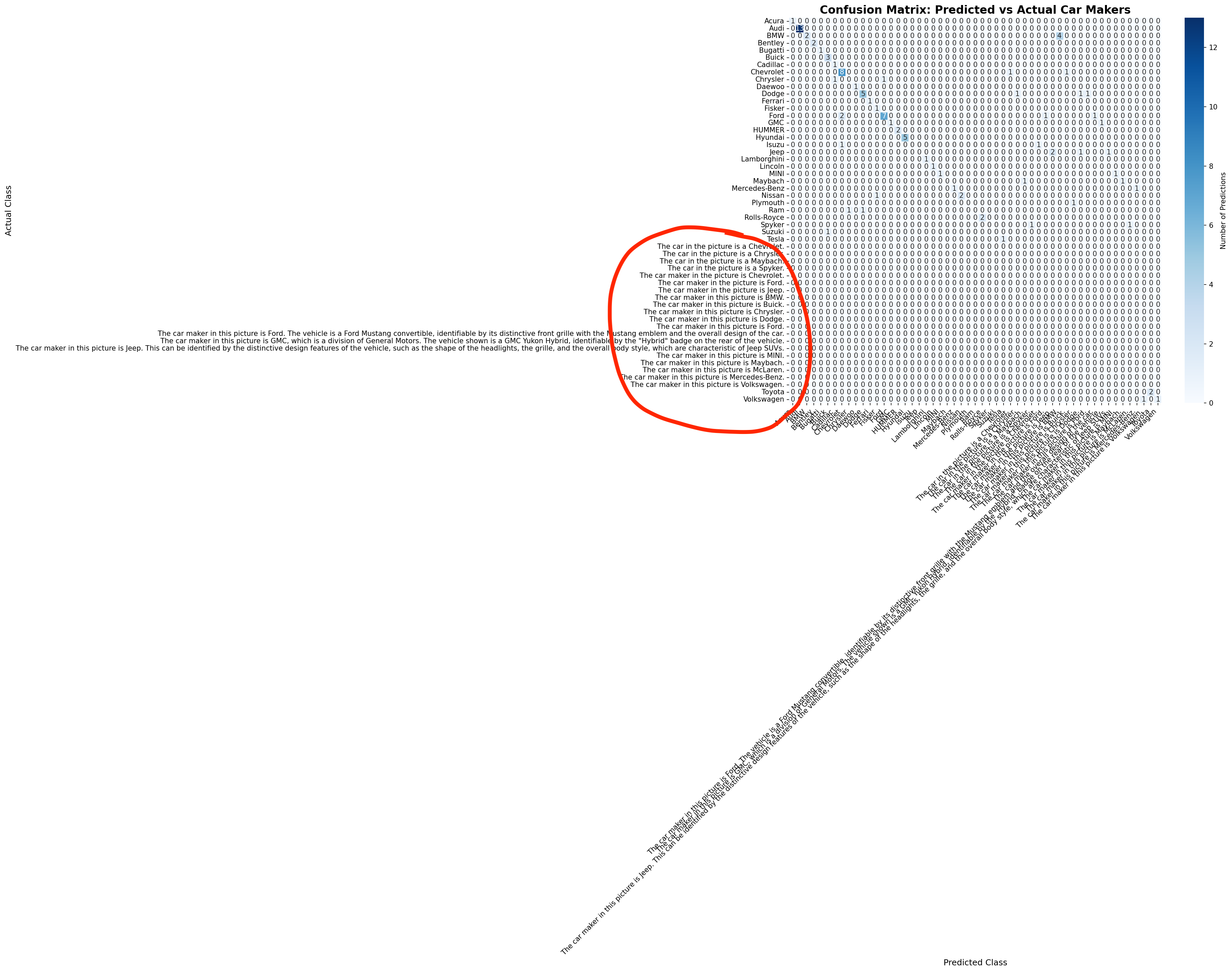
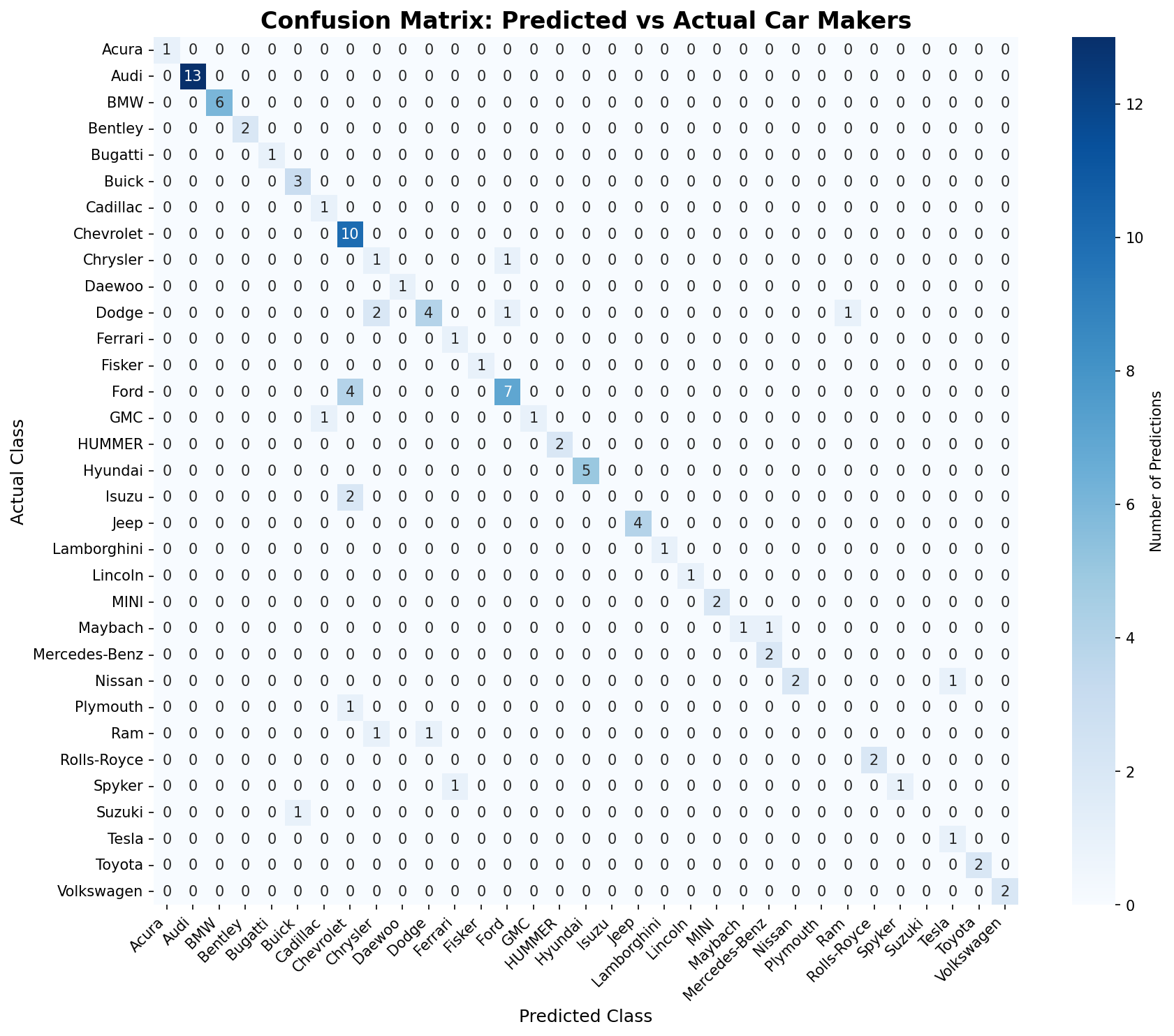
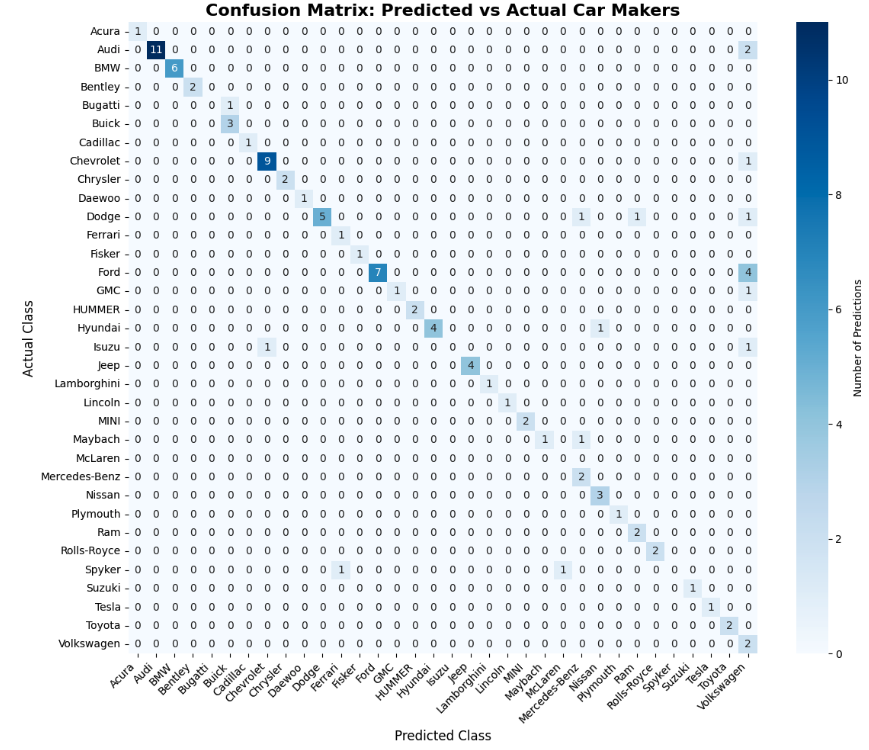
- the confusion matrix of the model. The confusion matrix is a matrix that shows the predicted labels vs the actual labels, and helps us understand better how the model performs for each class.
Baseline Results
Accuracy-wise, the 3B model is the only model that seems to work reasonably well out-of-the box, while the 450M and 1.6B models fail terribly.| Model | Accuracy |
|---|---|
| LFM2-VL-450M | 3% |
| LFM2-VL-1.6B | 0% |
| LFM2-VL-3B | 66% |
Step 3. Structured generation to increase model robustness

Structured generation is a technique that allows us to “force” the Language Model to output a specific format, like JSON, or, in our case, a valid entry from a list of car makers.Language Models generate text by sampling one token at a time. At each step of the decoding process, the model generates a probability distribution over the next token and samples one token from it.Structured generation techniques “intervene” at each step of the decoding process, by masking tokens that are not compatible with the structured output we want to generate.
Structured Generation Results
| Model | Accuracy |
|---|---|
| LFM2-VL-450M | 58% |
| LFM2-VL-1.6B | 74% |
| LFM2-VL-3B | 81% |
Step 4. Fine tuning with LoRA
To fine-tune the model, we will use the LoRA technique. LoRA is a parameter-efficient fine-tuning technique that allows us to fine-tune the model by adding and tuning a small number of parameters.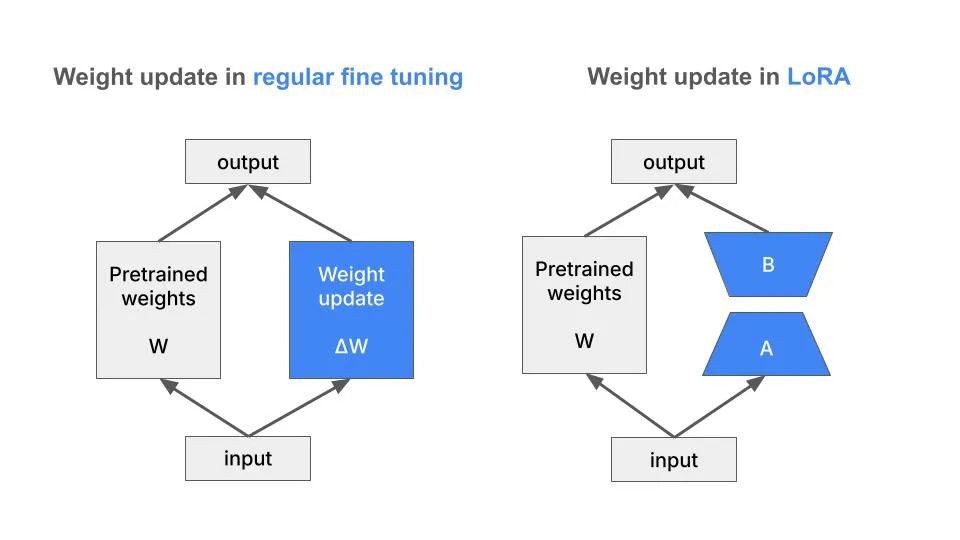
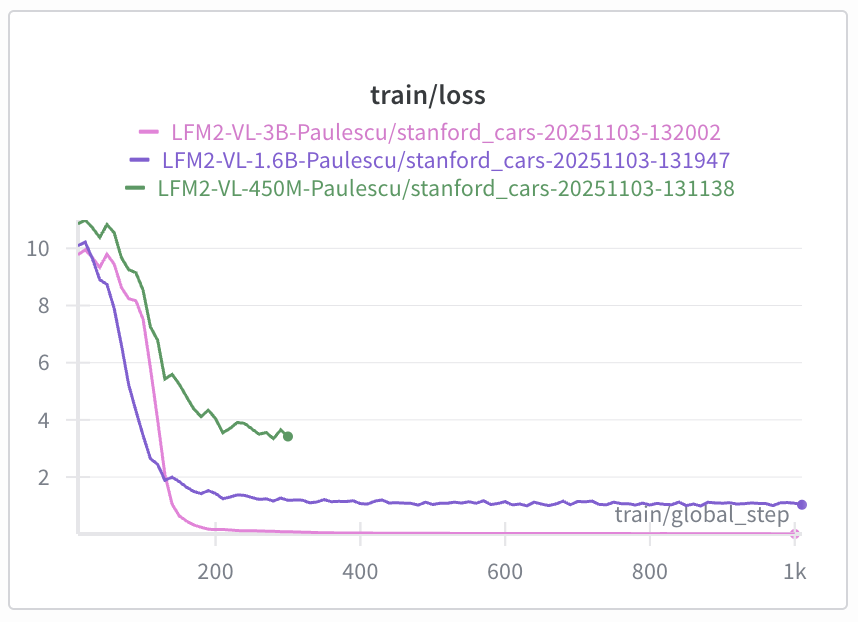
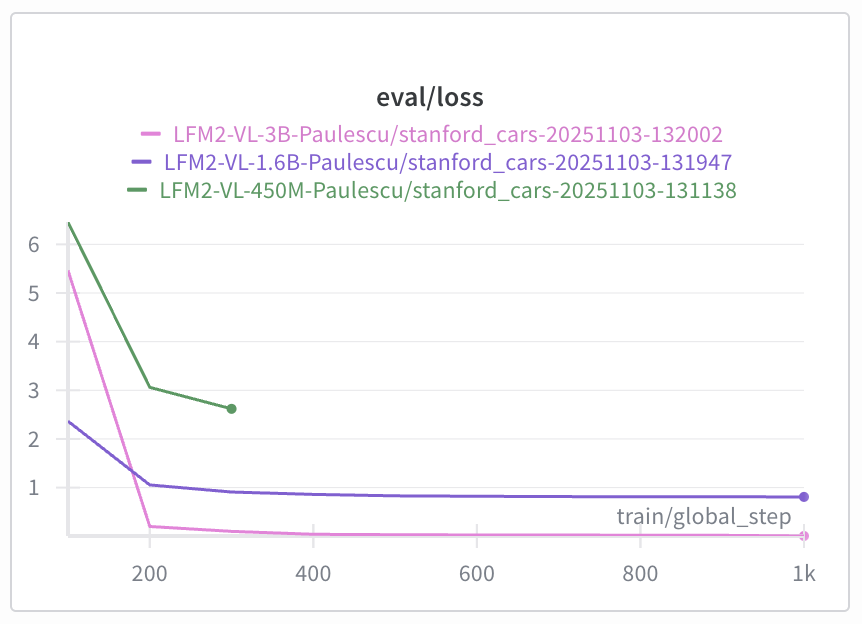
- the LFM2-VL-3B model has the lowest loss, and
- the LFM2-VL-450M model has the highest loss.
| Checkpoint | Train Loss | Eval Loss |
|---|---|---|
| 100 | 5.82 | 5.46 |
| 200 | 0.16 | 0.20 |
| 300 | 0.07 | 0.10 |
| 500 | 0.03 | 0.03 |
| 1000 | 0.008 | 0.005 |
Overfitting is when a model learns the noise in the training data, and does not generalize to the test set. In other words, the training loss is decreasing, but the evaluation loss is increasing.
Evaluate the fine-tuned model on the test set
To evaluate the fine-tuned model, we will use theevaluate.py script again, but this time we will use the last model checkpoint.
Fine-tuned Model Results
| Checkpoint | Accuracy |
|---|---|
| Base Model (LFM2-VL-3B) | 81% |
| checkpoint-1000 | 82% |
What’s next?
In this example we showed you the main steps to fine-tune a Vision Language Model for an image identification tasks. As we said before, the quality of your final model directly depends on the quality of the dataset used for the fine-tuning. To improve the dataset quality you can:- Increase quality by filtering out heavily cropped, occluded, or low-quality images where the brand isn’t clearly identifiable
- Increase diversity by doing data augmentation on the least represented classes.